AI Colorway Generator: How to Create Every Fashion Colorway from One Sample (2026)
An AI colorway generator turns one approved product into every color variant, true to a Pantone value, with real fabric texture kept. Here is how it works.
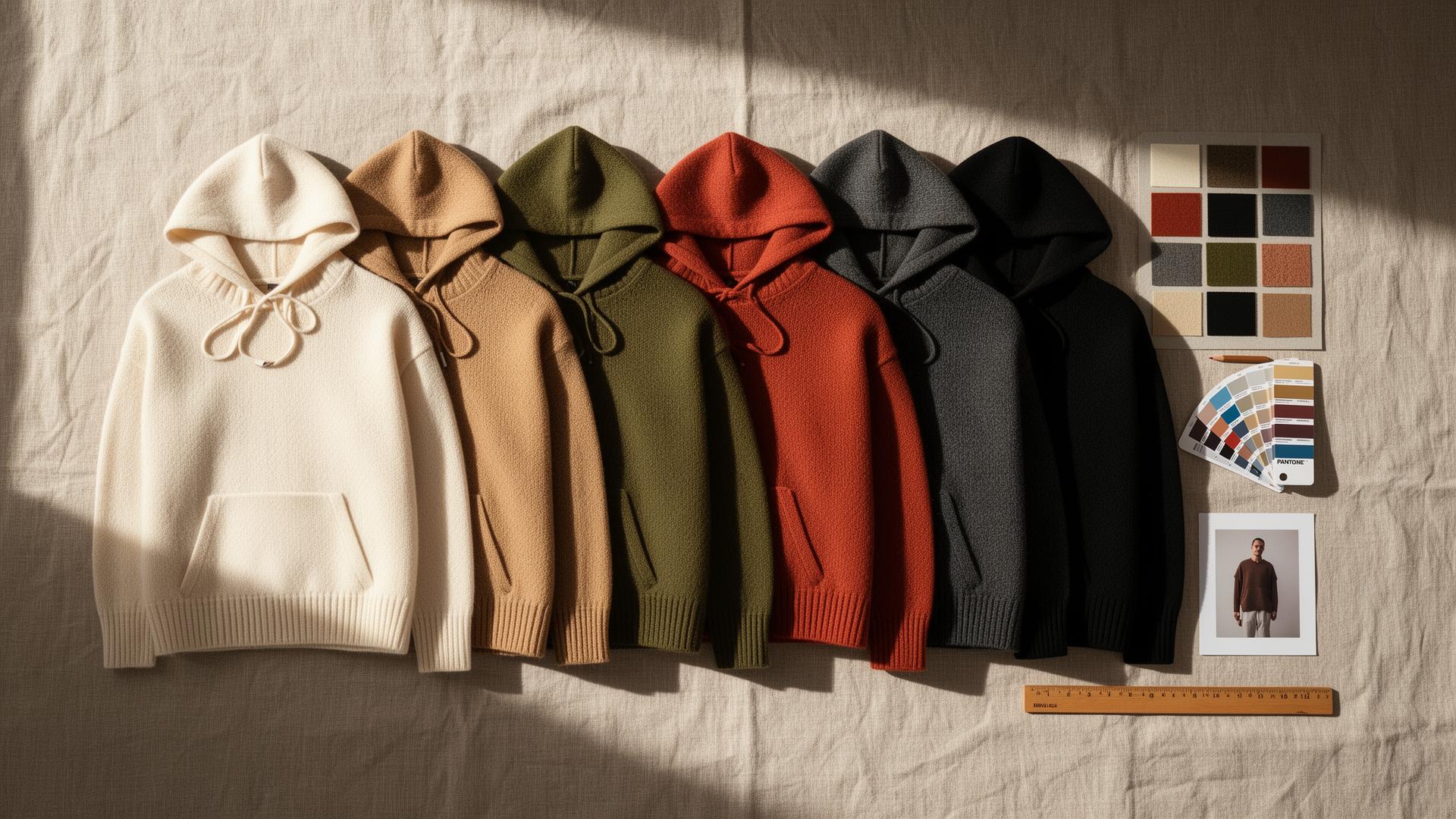
You have one sample in one color. You need it in six. The page is waiting on the other five, the photoshoot is booked for whenever the dyed samples arrive, and the launch keeps sliding to the right.
This is one of the quietest time sinks in fashion. The product is approved. The color variants are what hold everything up.
An AI colorway generator changes the order of operations. From one approved product, you generate every color variant, true to a target value, with the real fabric texture and shadows kept. This guide covers what a colorway is, how AI colorway generation works, how to get color right, and where a person still has to sign off.
If you only read one thing
- A colorway is a single color combination of a style. One jacket in black, olive, and sand is one style with three colorways.
- An AI colorway generator recolors one approved product into every variant, instead of dyeing and shooting each one.
- Good output keeps texture, shadow, and detail. A recolor is not a flat fill. The fabric still has to read as fabric.
- Color accuracy is the hard part. Match to a Pantone or hex value, and remember screen color is not the same as dyed fabric.
- AI generates, a human approves. Color sign-off stays with a person. Kampana recolors from one product node, with an approval gate on every variant.
What is a colorway?
A colorway is one specific color version of a design. The style stays the same. The color or color combination changes.
Take one hoodie. In black, in heather gray, and in forest green, that is one style with three colorways. For a print or a multi-color piece, a colorway is the full set of colors used together, so a stripe tee might have a navy-and-white colorway and a red-and-cream colorway.
Colorways matter for two reasons. They let one proven design cover more of the range without designing something new, and they let a brand offer choice without the cost of a new style. In merchandising terms, colorways are one of the cheapest ways to extend an assortment, which is why range planning leans on them so heavily.
What an AI colorway generator does
An AI colorway generator takes one image of an approved product and produces the same product in different colors. Instead of dyeing a sample per color and shooting each one, you generate the variants from the single approved shot.
The key word is generator, not filter. A cheap recolor slaps a flat color over the garment and loses the shadows and the texture. A real colorway generator changes the color while keeping the things that make it look like a real garment: the fold shadows, the seam highlights, the knit or weave, and the way light falls across the fabric.
Here is the difference in practice:
| Flat recolor (filter) | AI colorway generator | |
|---|---|---|
| Color change | Yes | Yes |
| Keeps shadows | No | Yes |
| Keeps fabric texture | No | Yes |
| Matches a target value | Roughly | To a specified value |
| Usable on a PDP | Rarely | Yes, after approval |
The goal is a variant that looks like you actually made that color, because a shopper should not be able to tell which colorway was the original sample.
Why brands waste time and money on color variants
The standard process for color variants is slow by default, and the cost repeats for every style.
The usual path looks like this. Approve the style in one color. Order dyed samples in the other colors. Wait for them to arrive. Book a shoot. Photograph each one. Edit each one. Only then can the full product page go live.
That creates three recurring problems:
- The launch waits on color. The product is ready, but the page cannot publish until every variant is shot. The slowest colorway sets the launch date.
- Cost scales with colors, not value. Each added color means another sample, another shoot, and another edit, whether or not that color sells.
- The catalog drifts. Variants shot on different days, in different light, look like different products. The range loses its consistency.
Refreshing a proven product is often a higher return move than inventing a new one. The same logic applies to color. A new colorway of a bestseller is low risk and high leverage. The blocker is not the idea. It is the production time per color.
How AI colorway generation works
The process is short, and the discipline is in the approval step. Here is the sequence.
1. Start from one approved product
Begin with one clear image of the approved garment in its base color. A clean product shot or a ghost mannequin image works well, because the cleaner the input, the better every variant looks.
This one image becomes the source of truth for every colorway, so it is worth getting right before you generate.
2. Set the target colors
Specify the colors you want. The best practice is to give an exact value, a Pantone reference or a hex code, rather than a vague name like "olive." This is what lets the output match your real dye lot instead of guessing at a shade.
You can generate a full color story at once: the core neutrals, the season's accent colors, and any carryover shades you always run.
3. Keep texture, shadow, and detail
This is where a real generator separates from a filter. The tool changes the color while preserving the fold shadows, the seam and stitch detail, the fabric texture, and the highlights. A ribbed cuff should still read as ribbed. A matte fleece should not turn glossy.
4. Approve each variant
Every variant gets checked against the target value and the real garment before it ships. Color is the most common thing to get wrong and the most expensive to ship wrong, so this step is not optional. AI generates the option. A person approves the color.
Recolor vs reshoot vs re-render
There are three ways to get a color variant onto a page. They are not equal in cost or speed.
| Reshoot | Re-render from 3D | AI recolor | |
|---|---|---|---|
| Needs a physical sample | Yes | No | No |
| Needs a 3D/CAD file | No | Yes | No |
| Speed per color | Slow | Medium | Fast |
| Cost per color | High | Medium | Low |
| Best when | You have all samples | You have 3D assets | You have one approved image |
Reshooting is the traditional route and the slowest. Re-rendering from a 3D or CAD file is a strong option if you already invest in digital product creation. AI recolor is the fastest when you have one approved product image and need the rest of the color story without waiting for dyed samples. Most brands end up using a mix, with recolor doing the heavy lifting for variant pages.
Getting color right: Pantone, hex, and screen vs fabric
Color is the part that trips brands up, so it deserves its own section.
First, specify color as a value, not a word. "Burgundy" means ten different things. A Pantone TPX/TPG reference or a hex code is a number you can match against. The Pantone Fashion, Home + Interiors system is the standard reference for textiles and apparel.
Second, understand that screen color and fabric color are different systems. Screens emit light in RGB, while print and many specs use CMYK, and dyed fabric reflects light differently again depending on the fiber and finish. A color that looks perfect on a monitor can read differently on a matte cotton versus a shiny technical fabric.
The practical rules:
- Generate to a target value, not a name.
- Check the variant against a physical reference when you can, especially for hero colors.
- Account for fabric finish. The same value reads differently on matte and glossy surfaces.
- Keep one source of truth for color so the PDP, the feed, and the marketing all use the same value.
An AI colorway generator helps you produce and preview variants fast. It does not replace a final color approval against a real standard. The two work together.
What an AI colorway generator should not decide
Being clear about the limits is what makes the rest trustworthy.
- Final color approval. A person signs off that the variant matches the target value and the real garment. The generator proposes, the human approves.
- Whether a color is producible. Some shades are hard or expensive to dye in a given fabric. AI should not imply a color your supplier cannot hit.
- The color story. Which colors to run, and how many, is a merchandising decision based on your customer and your range, not something to leave to a model.
The pattern that works is simple: AI generates the variants, a person decides and approves. Speed on the options, judgment on the call.
Common colorway mistakes and how to avoid them
The recolor looks flat
If a variant looks like a sticker, the tool filled the garment with a flat color and lost the shadows. Use a generator that preserves shadow and texture, and start from a clean, well-lit base image.
The color is wrong
A variant that ships off-shade is a return and a complaint. Always generate to a Pantone or hex value, and approve each variant against that value and the real sample before it goes live.
Texture disappears
Knit, ribbing, weave, and pile should survive the recolor. If a fleece turns plastic, reject it. Output that keeps fabric texture is the whole point.
Waiting for all samples before building the page
This is the habit that slows launches. Build the variant pages from the approved image and the color story, then confirm against physical samples as they arrive. Do not let the last dye lot set your launch date.
Inconsistent variants across the catalog
If each colorway is shot or generated differently, the range looks messy. Generate all variants from the same approved base so framing, light, and shape match across the set.
What to look for in an AI colorway tool
A short checklist when you evaluate options:
- Recolors from one approved product image, not a full reshoot.
- Matches a specified value (Pantone or hex), not just a color name.
- Keeps shadows, highlights, and fabric texture, so the variant looks real.
- Has an approval gate and a product-fidelity check on every variant.
- Generates a whole color story at once, not one color at a time.
- Connects to the rest of the page, so each approved variant flows into the PDP and the feed.
- Pricing that fits a fashion calendar, not per-seat fees that punish a small team.
The last point matters most. A pile of recolored images is not a launch. The variants have to flow into real pages and feeds.
How colorways affect your assortment and sell-through
Here is the part most articles skip. Colorways are a merchandising lever, not just a design step.
Adding a colorway to a proven style is one of the lowest-risk ways to grow an assortment. You already know the fit sells. A new color reaches a customer who liked the shape but not the shade, with none of the risk of a brand-new design. This is core to how a line plan is built and reviewed.
The blocker has always been production time per color, which pushes teams to run fewer variants than the demand would support. When you can generate and preview the full color story from one approved product, you can plan the assortment around what the customer wants, not around how many samples you can afford to shoot.
So the real question is not "can AI change the color of a photo." It is "can my color variants keep up with my range plan." That is a process question, and it is the one Kampana is built to answer.
How Kampana handles colorways
Kampana is an AI product creation OS for fashion brands. It runs colorway generation as connected steps on a node-based canvas. You drop one approved product at the center and wire it to a recolor node, set your target values, and generate the full color story. Each variant passes an approval gate and a product-fidelity check, then flows into the PDP, the feed, and the campaign.
What you get
- Every colorway from one approved product, matched to a target value
- Real fabric texture, shadow, and detail kept across all variants
- A consistent variant set with matching framing and light
- Each approved variant flowing into the full PDP and the marketplace feed
- A refresh path for carryover bestsellers in new seasonal colors
The old way vs Kampana
| The old way | With Kampana | |
|---|---|---|
| Samples | Dye and shoot every color | One approved image as input |
| Speed | Limited by sample lead time | Generate the color story at once |
| Color spec | Eyeballed per shoot | Target Pantone or hex value |
| Approval | Ad hoc edits | Approval gate + product-fidelity check |
| Beyond the image | Separate tools for PDP and feed | One canvas to PDP and feed |
| Pricing | Per shoot, per seat | Shared credits, unlimited users |
How it works
- Drop one approved product on the canvas.
- Wire it to the recolor node and set your target values.
- Approve each variant against the value and the real garment.
- Export channel-ready files, or flow each variant into the full PDP and feed.
Pricing is credit-based. One shared pool for the whole workspace, unlimited users, no per-seat fees, and credits do not expire. As a rough guide, refreshing a carryover product with a new color story runs 800 to 3,000 credits depending on how many variants and outputs you generate. You spend on what you actually produce.
Frequently asked questions
What is a colorway in fashion?
A colorway is one specific color version of a design. The style stays the same and the color changes, so one jacket in black, olive, and sand is one style with three colorways. For prints or multi-color pieces, a colorway is the full set of colors used together.
What does an AI colorway generator do?
It takes one image of an approved product and produces the same product in other colors, keeping the fabric texture, shadows, and detail. Instead of dyeing and shooting a sample per color, you generate the variants from a single approved shot and approve each one before it ships.
How is this different from just recoloring a photo with a filter?
A filter applies a flat color and loses the shadows and texture, so the garment looks fake. An AI colorway generator changes the color while preserving the things that make it read as real fabric: fold shadows, seam detail, knit or weave, and highlights. The result should look like a color you actually produced.
Can an AI colorway generator match a Pantone color?
You can specify a target value, such as a Pantone reference or a hex code, and generate to it. The Pantone Fashion, Home + Interiors system is the standard for textiles. For hero colors, still confirm the generated variant against a physical reference, because screen color and dyed fabric are different systems.
Why does color look different on screen than on the fabric?
Screens emit light in RGB while print and many specs use CMYK, and dyed fabric reflects light differently depending on the fiber and finish. The same value can read differently on a matte cotton versus a glossy technical fabric. This is why you generate to a value and confirm against a physical standard.
Do I need a physical sample for every color?
No. You can build the variant pages from one approved image and your color story, then confirm against physical samples as they arrive. This stops the slowest dye lot from setting your launch date.
Will AI replace my designer or color approval process?
No. The reliable pattern is AI generates and a person approves. The generator produces variants fast, but a person still decides the color story, signs off the final color against a standard, and confirms a shade is producible in that fabric.
How many colorways can I generate from one product?
As many as your color story needs. A common approach is to generate the core neutrals, the season's accent colors, and any carryover shades at once, then approve each variant. Generating them from the same approved base keeps the whole set consistent.
The bottom line
A colorway is a small idea with a big production cost, and that cost is what holds launches back.
An AI colorway generator changes the order of operations. From one approved product, you generate the full color story, true to a target value, with the texture and shadows kept, and a person approving every variant. You stop waiting for dyed samples to build the page, and you plan the assortment around what your customer wants instead of how many shoots you can afford.
If you want your color variants to keep up with your range plan, with an approval gate on every one, that is exactly what Kampana is built for. Start creating, free, or refresh a carryover product to see the full color story come from one sample.
Send one product URL. Kampana turns it into a mini campaign pack.