Fashion Tech Pack Template: What to Include (2026)
A fashion tech pack template, section by section: flats, BOM, points of measure, grading, construction, colorways, labels, and revisions.
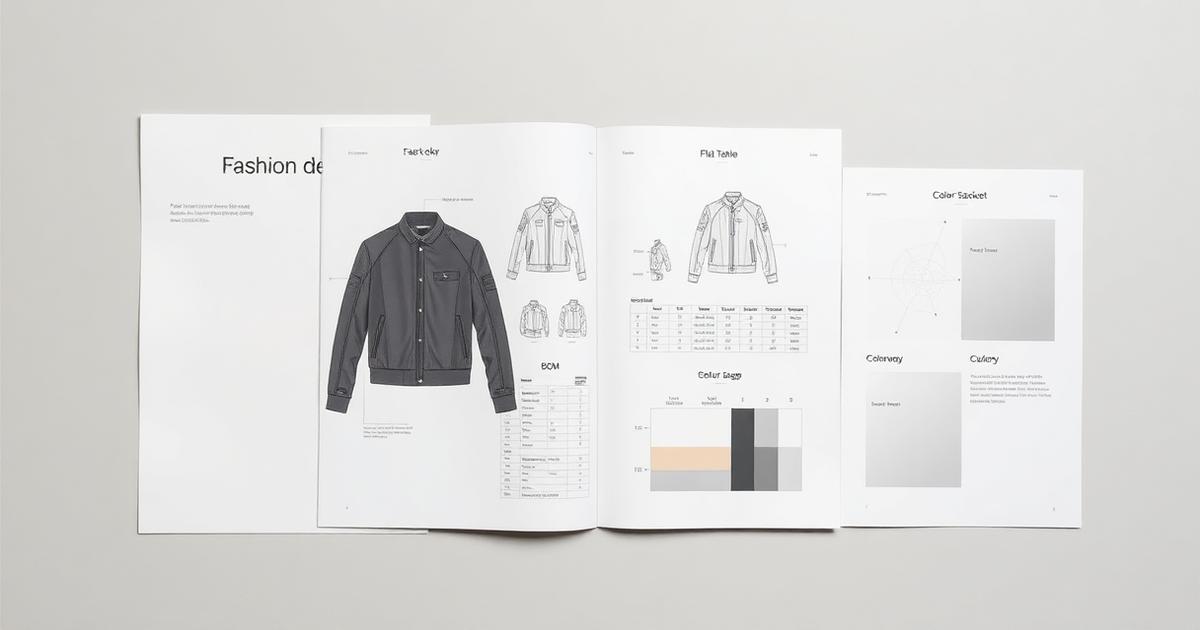
Your factory sent back a sample with the wrong pocket, the wrong thread, and a price you did not expect. None of that was their fault. They built what your tech pack told them to build, and your tech pack left half the questions open. A complete fashion tech pack template closes those questions before a sample is ever cut.
AI will not replace your technical designer. It gives them a starting pack so they validate instead of format. This guide is the template itself: every section a tech pack needs, what goes in each, the order they belong in, and how to build one that a factory can quote and sew without guessing.
Table of Contents
- TL;DR: What a tech pack template must include
- What is a fashion tech pack?
- Why an incomplete tech pack costs you money
- The anatomy of a tech pack template
- The 9 sections every tech pack template needs
- What a tech pack should not leave to the factory
- Tech pack template: the old way vs an assisted way
- How to build your first tech pack: a workflow
- Common tech pack mistakes and how to avoid them
- What to look for in a tech pack tool
- How a clean tech pack affects cost and lead time
- How Kampana builds a technical design assist pack
- FAQ
- The bottom line
TL;DR: What a tech pack template must include
- A fashion tech pack is the technical blueprint a factory uses to quote, sample, and produce a garment. It usually includes flats, a BOM, measurement specs, grading, construction notes, labeling, and packaging (Points of Measure).
- The non-negotiable sections: cover sheet, technical flats with callouts, bill of materials, points of measure, grading, construction details, colorways, labels and packaging, and revision history.
- The BOM lists every fabric, trim, thread, and component with supplier, color, and consumption. It is the most cost-sensitive page in the pack (Centric Software).
- The spec sheet defines fit using a base size, points of measure, and tolerances so every sample is checked the same way (Onbrand PLM).
- AI can draft and format the pack. The technical designer validates and approves. Map it to Kampana's technical design assist pack workflow.
What is a fashion tech pack?
A tech pack, short for technical package, is the document that tells a factory exactly how to make your garment. It is the spec, the parts list, the measurements, and the build instructions in one file. A factory uses it to quote a price, sew a sample, and run production.
A tech pack usually includes technical flats, a bill of materials, measurement specs, grading, construction notes, labeling, packaging, and costing (Points of Measure). It is the single source of truth between you and the people who build your product.
Here is the simplest way to think about it. A tech pack template is a form. A tech pack is that form filled out for one style. The template guarantees you never forget a section. The filled pack guarantees the factory never has to guess. For the broader process, see how to create a fashion tech pack with AI.
Why an incomplete tech pack costs you money
A missing section does not stay a small gap. It becomes a wrong sample, a re-quote, or a production delay. Every blank the factory fills in is a decision you did not make, made by someone who has never met your customer.
The three ways an incomplete tech pack costs you:
- Wrong samples. A vague construction note or missing measurement produces a sample you have to reject and redo. Each round is weeks.
- Bad quotes. Without a complete BOM, a factory cannot price accurately, so they pad the quote or re-quote after they learn the truth.
- Production drift. Gaps get filled differently across a run, and your sizes or trims come back inconsistent.
A tech pack is not paperwork you do at the end. It is the cheapest quality control in the whole process, because catching a problem on a page costs nothing and catching it in a sample costs a sampling round. Materials and components are the largest share of a garment's cost, which is why the parts list deserves real care (Centric Software).
The anatomy of a tech pack template
Before the section-by-section walk, here is the whole template at a glance. Think of it as the table of contents your factory expects to see.
| Section | What it answers | Who uses it |
|---|---|---|
| Cover sheet | What style, season, and brand is this? | Everyone |
| Technical flats | What does it look like, front and back? | Pattern, sewing |
| Bill of materials | What is it made of? | Sourcing, costing |
| Points of measure | What are the exact dimensions? | Pattern, QC |
| Grading | How does it scale across sizes? | Pattern |
| Construction | How is it sewn? | Sewing |
| Colorways | What colors and in what placement? | Sourcing, QC |
| Labels and packaging | How is it labeled and packed? | Finishing, shipping |
| Revision history | What changed and when? | Everyone |
A template that contains all nine is complete. One that drops a section quietly outsources that decision to the factory. Onbrand and other PLM tools structure their templates around this same set (Onbrand PLM).
The 9 sections every tech pack template needs
Now the detail. Build the template in this order. Each section assumes the ones before it.
1. Cover sheet and style summary
The first page identifies the style. Include the style name and number, the season, the brand, the category, the designer, the date, and the current version. Add a small image of the front flat for quick reference.
This page seems trivial until you have twelve styles in development and a factory emails about "the blue one." A clear style number ends that confusion. Put the version number here so everyone knows they are looking at the current pack.
2. Technical flats and callouts
Technical flats are clean, black-and-white line drawings of the garment, front and back, drawn flat and to proportion. They are not fashion sketches. They show seams, stitches, pockets, closures, and every construction feature.
Add callouts: arrows from the flat to short notes describing a detail, like "topstitch 1/4 inch" or "bartack at pocket corners." The callout page is where the build detail lives (Points of Measure). A factory reads the flats first, so they have to be exact.
3. Bill of materials (BOM)
The BOM is the parts list. It details every fabric, trim, thread, and component needed to build the garment, with supplier codes, Pantone colors, and consumption per size (Fashion Index).
A minimal BOM row carries: component, description, supplier, color or Pantone, placement, consumption, and unit. The BOM supports accurate costing, prevents missing components, and keeps production repeatable season after season. It is the most cost-sensitive page in the pack, so it gets its own deep dive in BOM for apparel: how to build a bill of materials.
4. Points of measure (POM) and spec sheet
The spec sheet defines the fit. It uses a base size and lists every point of measure with a target value and a tolerance, so every sample is checked the same way during fittings (Onbrand PLM).
A POM is a single measurement, like "chest width 1 inch below armhole" or "sleeve length from center back." Pair the list with a flat that has arrows showing exactly where each measurement is taken. Tolerances, often around plus or minus a quarter to half a centimeter, tell QC how much variation is acceptable.
5. Grading and size range
Grading is how the base size scales up and down into the full size range. Start from the base size measurements, then apply grade rules, the increments each POM grows or shrinks per size (Points of Measure).
Include your full size range and the grade rules per POM. A garment that fits perfectly in the base size can still fit badly at the edges of the range if the grading is wrong. Industry sizing references like the ASTM body measurement standards give a starting point for grade rules (ASTM International).
6. Construction details
Construction notes describe how the garment is sewn: seam types, stitch types, seam allowances, and reinforcement details. This is where you specify a French seam versus an overlock, a coverstitch hem versus a blind hem, a bartack at a stress point.
Be specific. "Sew the side seam" is not an instruction. "1/2 inch seam allowance, overlock finish, topstitch 1/4 inch" is. The more precise this section, the fewer surprises in the sample.
7. Colorways
A colorway is one color combination of the style. List each colorway with the Pantone or lab-dip reference for every component in that combination. A two-color garment in three colorways needs all six color callouts.
Tie each colorway back to the BOM so sourcing knows which materials to order in which color. Pantone's matching system is the standard reference for communicating color to a factory (Pantone).
8. Labels, packaging, and care
This section covers everything that is not the garment body: brand labels, size labels, care and content labels, hangtags, polybags, and folding or hanging instructions. Include placement, size, and material for each.
Care and content labels are also a legal requirement in many markets, so this is not optional decoration. In the United States, fiber content and care labeling are governed by federal rules (U.S. Federal Trade Commission).
9. Revision history
Every tech pack changes. The revision history logs what changed, when, and why, with a version number. Without it, your factory may sew from an old version while you think they have the new one.
Keep it simple: version, date, section changed, and a one-line note. This single page prevents the most expensive mistake in tech packs, building the wrong version.
What a tech pack should not leave to the factory
A factory is brilliant at building what you specify. It is not your designer. Anything you leave blank, it will fill with its default, which may not be yours.
Do not leave these to the factory:
- Fit. Your POMs and tolerances define the fit. Leave them out and you get the factory's block, not yours.
- Materials. A vague "cotton" becomes whatever cotton is cheapest on hand. Specify weight, weave, and supplier.
- Color. "Navy" is a hundred navies. A Pantone or lab dip is one.
- Construction at stress points. Where a garment fails is where you most need an explicit instruction.
The technical designer's judgment is what fills these in. AI can draft the pack and catch missing fields, but a human validates the fit, the materials, and the build. Kampana keeps a human approval gate on the pack for exactly this reason.
Tech pack template: the old way vs an assisted way
Most small brands build tech packs by hand in a spreadsheet or a slide deck. It works, but it is slow, and the same fields get re-typed every style.
| Old way (manual template) | Assisted (on a canvas) | |
|---|---|---|
| Starting point | Blank template, retyped each style | Pre-filled draft from the product |
| Flats | Drawn or sourced separately | Generated from the design |
| BOM | Re-keyed per style | Reused and adjusted from a library |
| Missing fields | Found by the factory | Flagged before handoff |
| Versions | Easy to lose track | Tracked with revision history |
| Handoff | Email a PDF | Export a factory-ready pack |
The assisted approach does not replace the technical designer. It removes the formatting tax so they spend their time validating fit and construction, not typing. Compare the full set on the Kampana workflows hub.
How to build your first tech pack: a workflow
You can build a complete pack in one ordered pass.
- Start the cover sheet. Style name, number, season, version.
- Draw the flats front and back, then add callouts for every construction feature.
- Build the BOM. List every fabric, trim, thread, and component with supplier, color, and consumption.
- Write the spec sheet. Base size, every POM, and tolerances, with a measured flat.
- Add grading. Size range and grade rules per POM.
- Document construction. Seam types, stitches, allowances, reinforcements.
- Define colorways with Pantone references tied to the BOM.
- Specify labels and packaging, including care and content.
- Open a revision log and version the pack before you send it.
Run that once and you have a factory-ready pack. To draft steps 2 through 6 from your product automatically, start with the technical design assist pack workflow.
Common tech pack mistakes and how to avoid them
Vague construction notes
The fix: specify seam type, stitch, allowance, and finish for every seam. "Sew the hem" invites a guess. "1 inch coverstitch hem" does not.
Naming colors instead of referencing them
The fix: use Pantone or lab dips, never color names. A color name is a range. A Pantone code is one color, the same in every factory (Pantone).
Specs without tolerances
The fix: give every POM a tolerance. Without one, QC has no rule to check against, and "close enough" becomes whatever the line decides (Onbrand PLM).
No revision history
The fix: version every pack and log every change. The most expensive tech pack mistake is a factory building from last week's file. A revision log prevents it.
What to look for in a tech pack tool
If you are choosing software to build tech packs, judge it on whether it produces a factory-ready pack with less re-keying.
- A complete template with all nine sections, so nothing is forgotten.
- Flats from your design, not a separate drawing step.
- A reusable BOM library, so common trims are not retyped each style.
- Missing-field flags before handoff, not after.
- Tolerances and grading built in, not bolted on.
- Version control with a revision history.
- A human approval gate, because the technical designer signs off.
A tool that just gives you a blank template has saved you nothing. One that drafts the pack from your product and flags the gaps has. See how it prices on Kampana pricing.
How a clean tech pack affects cost and lead time
A tech pack is a lead-time and cost lever disguised as a document. The cleaner it is, the faster and cheaper the path to production.
A complete pack means accurate quotes. A factory that can read a full BOM and spec sheet prices the real garment, not a padded guess. That tightens your margin before the first sample, since materials and components carry the bulk of a garment's cost (Centric Software).
A complete pack also cuts sampling rounds. Each rejected sample is weeks of lead time and a sampling fee. A precise spec, exact flats, and explicit construction notes mean the first sample comes back closer to right, which means fewer rounds and an earlier ship date. On a fashion calendar where the delivery window is fixed, every saved round protects your in-season sales. From here the validated product flows into PDP assets and the rest of the end-to-end launch.
How Kampana builds a technical design assist pack
Kampana is an AI product creation OS for fashion brands. It turns one product into design, 3D renders, tech packs, PDP imagery, B2B sell-in kits, marketplace feeds, and social campaigns, on a node-based canvas with approval gates and product-fidelity QA. The tech pack is one node in that flow, and it starts from the product instead of a blank template.
Instead of retyping a template per style, you drop the product on the canvas and Kampana drafts the assist pack: flats, a starting BOM, a spec structure, and construction prompts, for your technical designer to validate.
What you get
- A drafted pack with all nine sections structured and ready to validate.
- Technical flats generated from the design, front and back.
- A starting BOM you adjust, with reusable components across styles.
- A spec sheet scaffold with POMs and tolerance fields.
- Missing-field flags before handoff.
- A human approval gate and product-fidelity QA before the pack ships.
The old way vs Kampana
| Old way | With Kampana | |
|---|---|---|
| Starting point | Blank template per style | Drafted pack from the product |
| Flats | Separate drawing step | Generated from the design |
| BOM | Re-keyed each time | Reused and adjusted |
| Gaps | Found by the factory | Flagged before handoff |
| Versions | Manual, easy to lose | Tracked on the canvas |
| Sign-off | Scattered | One approval gate, product-fidelity QA |
How it works
- Drop one product on the canvas.
- Wire it to the technical design assist pack node.
- Review the drafted flats, BOM, and spec structure.
- Validate fit, materials, and construction as the technical designer.
- Approve at the human gate.
- Export a factory-ready pack and move into PDP and campaign assets.
Pricing is credit-based. You draw from one shared credit pool, with no seats and no subscription, and credits do not expire. There is a free starter pack to build your first tech pack, and an assist pack draws a modest credit range because it is mostly structure and QA. See current ranges on Kampana pricing.
AI will not replace your technical designer. It gives them a starting pack so they validate instead of format.
FAQ
What is a fashion tech pack?
A tech pack is the technical blueprint a factory uses to quote, sample, and produce a garment. It typically includes flats, a bill of materials, measurement specs, grading, construction notes, labeling, and packaging (Points of Measure).
What should a tech pack template include?
A complete template has nine sections: cover sheet, technical flats with callouts, bill of materials, points of measure and spec sheet, grading, construction details, colorways, labels and packaging, and a revision history. Drop any one and you hand that decision to the factory.
What is the difference between a BOM and a spec sheet?
The BOM is the parts list: every fabric, trim, thread, and component with supplier, color, and consumption. The spec sheet is the measurement list: the points of measure and tolerances that define fit. A complete tech pack needs both (Fashion Index).
What are points of measure (POM)?
A point of measure is a single defined measurement on a garment, like chest width or sleeve length, taken at a specific location. The spec sheet lists every POM with a target value and a tolerance so every sample is checked the same way (Onbrand PLM).
Do I need grading in my tech pack?
Yes, if you sell more than one size. Grading sets the increments each measurement changes per size, scaling the base size across your range. Standard body measurement references such as ASTM's give a starting point for grade rules (ASTM International).
Can AI create a tech pack?
AI can draft and format a pack: generate flats, scaffold the BOM and spec sheet, and flag missing fields. It should not be the final authority on fit, materials, or construction. A technical designer validates and approves, and Kampana keeps a human approval gate on the pack.
How do I specify color in a tech pack?
Use a standardized color reference, not a color name. Pantone's matching system gives every component an exact, repeatable color callout that reads the same in any factory (Pantone). Tie each color back to the BOM and colorway.
Why does my tech pack need a revision history?
Because tech packs change, and a factory may sew from an old version if it cannot tell which is current. A revision log with version numbers, dates, and change notes prevents the costly mistake of building the wrong version.
The bottom line
A tech pack template is the cheapest insurance in product development. The blanks you leave become the mistakes you pay for in samples, quotes, and lead time.
Build all nine sections: cover, flats, BOM, spec, grading, construction, colorways, labels, and revision history. Specify fit, materials, color, and construction so the factory never has to guess. Version the pack so everyone builds from the same file.
Do that and the sample comes back closer to right, the quote comes back honest, and the season ships on time. Ready to draft yours from the product? Build a technical design assist pack with Kampana or start creating for free.
Send one product URL. Kampana turns it into a mini campaign pack.