How to Make a Tech Pack from a Sketch: A Step-by-Step Guide (2026)
Turn a sketch into a factory-ready tech pack: clean flats, construction callouts, spec and POM, BOM, colorways, and handoff notes that quote first time.
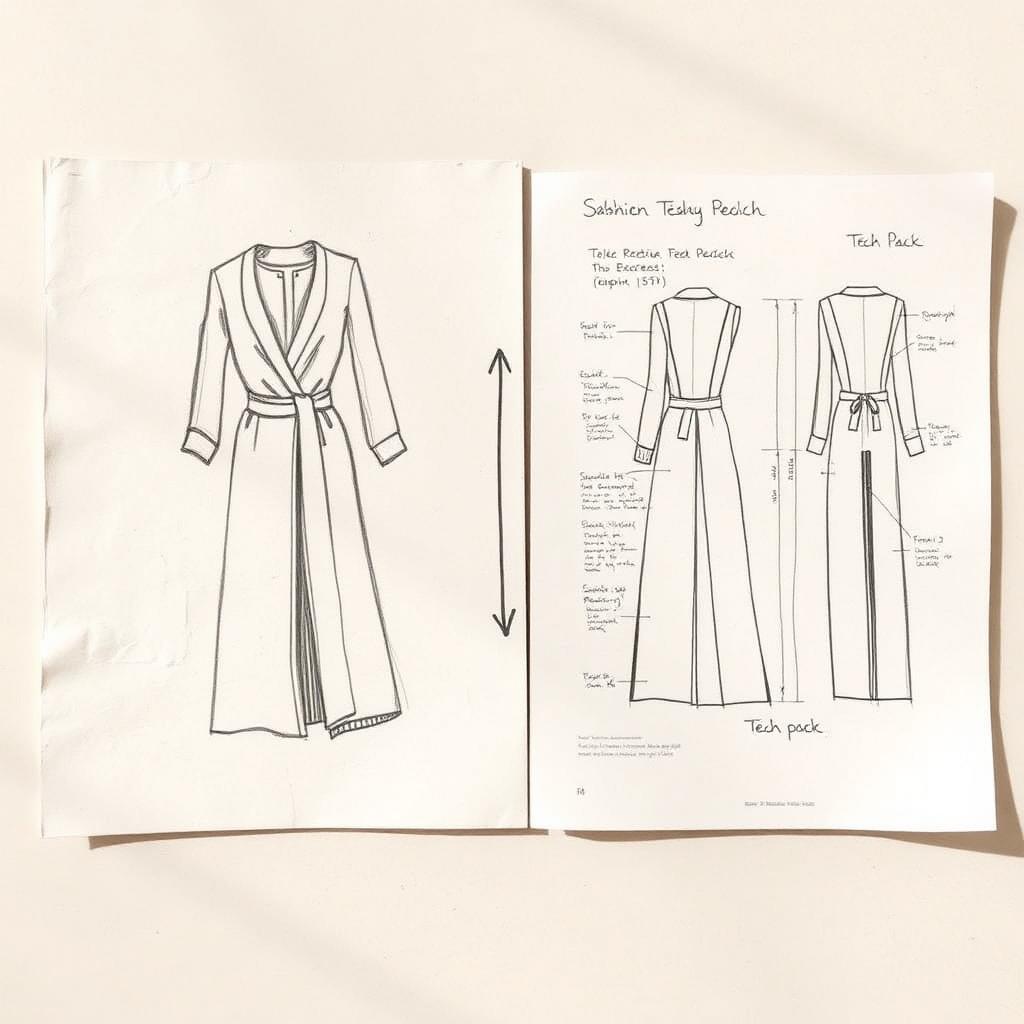
You have a sketch. It might be a napkin drawing, a hand sketch in a notebook, or a rendered concept. What you do not have is anything a factory will quote. A sketch is an idea. A tech pack is an instruction.
This guide walks the gap. It shows how to turn a sketch into the flats, specs, materials, and construction notes a factory needs to build your garment right the first time. A sketch shows what you want it to look like. A tech pack tells someone exactly how to make it.
Table of Contents
- TL;DR: From sketch to tech pack in five lines
- What is a tech pack, and why a sketch is not one
- Sketch vs technical flat: the difference that matters
- What a factory needs that a sketch leaves out
- What goes in a tech pack built from a sketch
- The 7 steps to make a tech pack from a sketch
- Hand sketch vs CAD: where to start
- The old way vs an AI-assisted way
- Common mistakes turning a sketch into a tech pack
- What to look for in a sketch-to-tech-pack tool
- How a tech pack from a sketch affects cost and samples
- How Kampana turns a sketch into a tech pack
- FAQ
- The bottom line
TL;DR: From sketch to tech pack in five lines
- A tech pack is the document that tells a manufacturer how to make a garment: flats, measurements, materials, and construction details (Techpacker).
- A sketch is a starting point. The first job is to turn it into clean, black-and-white technical flats that show every construction detail (Fashion Index).
- From the flats you build the spec sheet and POM page, the bill of materials, colorways, and construction notes (Onbrand).
- Most factories will not quote or produce without a clear tech pack (Techpacker).
- AI can draft the tech pack from your sketch. A technical designer validates it. Map it to Kampana's technical design assist pack workflow.
What is a tech pack, and why a sketch is not one
A tech pack, short for technical package, is a set of documents that explains a design to a manufacturer so they can turn it into a finished garment. It is the blueprint: flat sketches, materials, measurement specs, gradings, and colorways, all in one place (Techpacker).
A sketch is none of that. A sketch communicates a look. It does not say what fabric, what weight, what seams, what measurements, or what trims. Most contractors and factories will not take an order without a clear, detailed tech pack, because the sketch leaves too much to guess (Techpacker).
The tech pack also minimizes risk for both sides by setting out exactly what the product should be, and it serves as the master document to track development, comments, and revisions (Techpacker). For the full document, see the fashion tech pack template.
Sketch vs technical flat: the difference that matters
The first real step from sketch to tech pack is the technical flat. A technical flat, also called a fashion flat or technical drawing, is a precise, black-and-white illustration of the garment that captures every construction detail (Fashion Index).
This is different from a fashion illustration. Illustrations are artistic and stylized, often on a figure with movement. Flats are functional and straightforward, focused only on the garment's structure (Fashion Index).
| Sketch / illustration | Technical flat | |
|---|---|---|
| Purpose | Show the look | Show the construction |
| Style | Artistic, on a figure | Flat, black and white |
| Detail | Mood and silhouette | Every seam, stitch, trim |
| Audience | You, your team | Pattern maker, factory |
| Views | One, often front | Front, back, and details |
A flat is what a pattern maker reads. If a detail is not shown or labeled on it, there is a risk it will not get produced correctly, or at all (Fashion Index).
What a factory needs that a sketch leaves out
A sketch usually shows the front, a silhouette, and a vibe. A factory needs far more before it can cut a sample.
- Multiple views: front, back, and side, plus close-ups of construction details (Techpacker).
- Construction callouts: seam types, topstitch placement, closures, and finishing.
- Measurements by size, with tolerances.
- Materials: fabric type, weight, fiber content, trims, and labels.
- Colorways and color codes.
- Packaging and labeling notes.
A sketch answers one question, what it looks like. A tech pack answers every other question a factory has, which is why the sketch is the input and the tech pack is the deliverable (Onbrand).
What goes in a tech pack built from a sketch
When you build the tech pack from a sketch, you are filling in everything the sketch did not carry. A typical tech pack includes these parts (Onbrand).
| Section | What it carries | Built from the sketch by |
|---|---|---|
| Cover page | Style name, season, date, contacts | Naming and dating the style |
| Technical flats | Front, back, detail views | Redrawing the sketch as flats |
| Spec sheet / POM | Measurements by size, tolerances | Measuring a sample or pattern |
| Bill of materials | Fabric, trims, labels, packaging | Specifying every component |
| Construction details | Stitches, seams, finishing | Annotating the flats |
| Colorways | Color options and codes | Assigning color per component |
| Cost sheet | Material, labor, overhead | Rolling up the BOM |
Each part starts where the sketch ends. The flats come from the drawing, the spec from a measured sample, the BOM from the materials you choose, and the construction notes from the callouts you add.
The 7 steps to make a tech pack from a sketch
Build the tech pack in this order. Each step depends on the one before it.
Step 1: Turn the sketch into clean flats
Redraw the sketch as a clean, black-and-white technical flat. Keep the lines accurate and labeled, and show the garment without stylization or movement. Adobe Illustrator is the common tool for this, though AI-assisted tools now draft flats too (Onbrand).
Follow the standard sketching conventions so any factory can read them: solid lines for seams, dashed lines for stitching (Fashion Index). Produce front and back at minimum, plus side and interior views where the design needs them.
Step 2: Annotate construction details
A flat alone is not enough. Add callouts and annotations for anything not obvious: stitch placement, seam types, hardware locations, and special features (Techpacker). Use labeled arrows pointing to collars, plackets, cuffs, fastenings, and artwork placement.
Be as detailed as the garment requires, but do not overcomplicate the drawing. Detail is crucial, and so is clarity, so the sketch stays easy to interpret by anyone in production (Fashion Index). Do not call out a detail that is not visible on the flat.
Step 3: Build the spec sheet and POM page
Take real measurements from a sample or a finished pattern and build the spec sheet. Include precise values for each point of measure across the size range, with tolerances (Onbrand).
Pair the chart with a points of measure page: a flat with lettered arrows and a how-to-measure line for each point, so the factory measures the same way you do. For the full method, see the POM measurement guide.
Step 4: List materials in the BOM
Build the bill of materials: every fabric, trim, thread, label, and packaging item the garment needs. Be specific. Instead of "cotton," write the fiber, weight, and weave, like "100% organic cotton, 200 GSM, plain weave" (Onbrand).
A complete BOM is what lets a factory source correctly and quote accurately. For the full build, see BOM for apparel.
Step 5: Add colorways
Define the color options for the style and assign a color to each component, by code rather than name. A single flat can carry several colorways, and each needs its trims and threads specified in the right shade.
Tie the colorways back to the BOM so a three-color run orders the right components in the right colors. This is where the sketch's single look becomes a producible color range.
Step 6: Write construction and finishing notes
Explain how the garment is assembled: stitch types like flatlock or double-needle, seam placements, pocket construction, and finishing (Onbrand). Where you can, back the notes with detailed callouts on the flats.
Where it helps, specify seam allowances and stitches per inch for sewing guidance (Fashion Index). These notes are what turn a drawing into a buildable garment.
Step 7: Review, version, and hand off
Before you send it, check everything. Look for missing measurements, details that do not match, or flats that are out of date. Clean formatting matters, because the factory should find details without guessing (Onbrand).
Save with a clear file name and maintain version control, like "Jacket_Style123_TechPack_v2," so every revision is tracked as the design evolves (Onbrand). Then hand it to the factory.
Hand sketch vs CAD: where to start
You can start from a hand sketch or a CAD drawing. Both can become a tech pack. The difference is how much redrawing the flats take.
| Starting point | Pros | What you still need |
|---|---|---|
| Hand sketch | Fast, expressive, no software | Redraw as clean flats |
| CAD / Illustrator flat | Already production-style | Annotations, spec, BOM |
| 3D / CLO file | Accurate proportions, reusable | Flats, spec, materials pulled through |
A hand sketch needs the most translation, since it has to be redrawn as flats before anything else. A technical designer often builds the BOM from a CAD drawing, because the CAD already carries accurate proportions (Techpacker). Wherever you start, the tech pack sections are the same.
The old way vs an AI-assisted way
The traditional path from sketch to tech pack is slow and manual. You redraw flats in Illustrator, build the spec in Excel, retype the BOM, and chase versions over email. Spreadsheets are static and fragmented, which makes the work prone to mistakes and hard to reuse (Techpacker).
| Old way | AI-assisted way | |
|---|---|---|
| Flats | Redrawn by hand each time | Drafted from the sketch |
| Spec / POM | Built cell by cell | Drafted, then validated |
| BOM | Retyped per style | Reused from a library |
| Versions | Emailed back and forth | Tracked in one place |
| Reuse | Copy the whole file | Components carry forward |
| Sign-off | Scattered | One approval gate |
An AI-assisted path drafts the structure from your sketch and lets a technical designer validate it, instead of formatting from a blank page. The human still owns fit and construction. The machine handles the typing.
Common mistakes turning a sketch into a tech pack
Sending the sketch instead of flats
A stylized sketch is not buildable. Without clean flats, the factory misreads the construction. Fix it by redrawing the sketch as black-and-white technical flats with standard line conventions (Fashion Index).
Vague or missing annotations
Flats that lack callouts get misinterpreted. Fix it with clear annotations for stitch placement, seams, and special features, using labeled arrows (Techpacker).
Missing measurements or tolerances
Leaving out sizing details or tolerances leads to poor fit. Fix it by completing the spec sheet for the full size range and pairing it with a POM page (Onbrand).
Incomplete material details
"Cotton" is not sourceable. Vague fabric, weight, or color information makes the factory guess. Fix it by filling the BOM with specifics: fiber, weight, weave, and color codes (Onbrand).
Outdated files and no version control
Small updates get lost without versioning. Fix it by keeping one master file, clear file names, and a tracked revision history (Onbrand).
What to look for in a sketch-to-tech-pack tool
When you choose a tool to turn sketches into tech packs, look for the things that cut the manual work:
- Flat drafting that starts from your sketch, not a blank canvas.
- A reusable component library, so sketches, measurements, and materials carry across collections (Techpacker).
- A live, connected tech pack instead of static, fragmented spreadsheets (Techpacker).
- A fit-history view to log actual sample measurements against the spec and check tolerances (Techpacker).
- Real-time collaboration, so the team and factory work from one version (Onbrand).
- One approval step before the pack ships.
The aim is a path where the sketch becomes a structured tech pack quickly and the parts stay connected, so a change in the flat updates the spec instead of leaving them out of sync.
How a tech pack from a sketch affects cost and samples
The tech pack is what stands between a sketch and a quote. A factory prices what the tech pack describes, and a detailed pack lets it gauge time and cost accurately (Techpacker). A thin pack gets a padded quote or a re-quote.
It also controls how many samples you pay for. A complete, easy-to-read tech pack helps you get error-free samples that match your original vision, and its goal is to minimize the number of samples and reach market faster (Techpacker). Each avoided sample round is freight and weeks saved.
And it protects fit over time. With a tech pack, you can register actual sample measurements against the spec and check whether each point is within tolerance, which improves fit quality round over round (Techpacker). The sketch starts the idea. The tech pack is what makes it producible, quotable, and repeatable.
How Kampana turns a sketch into a tech pack
Kampana is an AI product creation OS for fashion brands. It turns one product into design, 3D renders, tech packs, PDP imagery, B2B sell-in kits, marketplace feeds, and social campaigns, on a node-based canvas with approval gates and product-fidelity QA. The tech pack is drafted from your sketch instead of a blank page.
You drop the sketch on the canvas, and Kampana drafts a starting tech pack: clean flats, a spec sheet and POM page, a BOM with reusable components, colorways, and construction notes for your technical designer to validate.
What you get
- Clean technical flats drafted from the sketch.
- A spec sheet and POM page to validate and grade.
- A drafted BOM with reusable trims and components.
- Colorways tied to the BOM.
- Construction notes anchored to the flats.
- A human approval gate and product-fidelity QA before the pack ships.
The old way vs Kampana
| Old way | With Kampana | |
|---|---|---|
| Flats | Redrawn from scratch | Drafted from the sketch |
| Spec / POM | Built cell by cell | Drafted, then validated |
| BOM | Retyped per style | Reused from a library |
| Versions | Emailed around | Tracked on the canvas |
| Reconciliation | Sections drift apart | Tied to one product |
| Sign-off | Scattered | One approval gate, product-fidelity QA |
How it works
- Drop your sketch on the canvas.
- Wire it to the technical design assist pack node.
- Review the drafted flats, spec, BOM, and construction notes.
- Validate fit, materials, and construction as the technical designer.
- Approve at the human gate.
- Export the full tech pack and carry the product into your PDP asset pack or line plan.
Pricing is credit-based. You draw from one shared credit pool, with no seats and no subscription, and credits do not expire. There is a free starter pack to build your first tech pack, and an assist pack draws a modest credit range because it is mostly structure and QA. See current ranges on Kampana pricing.
AI will not replace your technical designer. It gives them a starting pack so they validate the design instead of formatting it. Want the whole launch? Start with the technical design assist pack or see the end-to-end collection launch.
FAQ
Can you make a tech pack from a hand sketch?
Yes. A hand sketch is a valid starting point. The first step is to redraw it as clean, black-and-white technical flats, then build the spec, BOM, colorways, and construction notes around them (Fashion Index). The hand sketch just needs the most translation into flats.
What is the difference between a sketch and a tech pack?
A sketch shows what a garment should look like. A tech pack tells a manufacturer how to make it, with flats, measurements, materials, and construction details (Techpacker). The sketch is the input; the tech pack is the deliverable.
Do I need Adobe Illustrator to make a tech pack?
Illustrator is the common tool for technical flats, but it is not the only path. Many teams use Illustrator for flats and Excel for specs, while AI-assisted and PLM tools now draft flats and tech packs too (Onbrand). The tool matters less than the completeness of the pack.
What is a technical flat?
A technical flat, also called a fashion flat, is a precise, black-and-white illustration of a garment that captures every construction detail from multiple angles (Fashion Index). It is what a pattern maker and factory read, unlike a stylized fashion illustration.
How long does it take to make a tech pack from a sketch?
It varies by garment complexity and how complete your sketch is. The slow parts are redrawing flats and building the spec and BOM by hand. AI-assisted tools shorten this by drafting the structure from the sketch, leaving the technical designer to validate rather than format.
Why won't factories work without a tech pack?
Most contractors and factories will not take an order without a clear, detailed tech pack because it sets out the exact specifications and minimizes risk for both sides (Techpacker). Without one, samples come back wrong and quotes are guesses.
What should I include in flats for a tech pack?
Include front, back, and side views, plus close-ups of construction details, with callouts for stitch placement, seams, and hardware (Techpacker). Use solid lines for seams and dashed lines for stitching, and do not call out a detail that is not drawn (Fashion Index).
Can AI turn my sketch into a tech pack?
AI can draft the tech pack from a sketch: the flats, spec and POM page, BOM, colorways, and construction notes. A technical designer then validates fit, materials, and construction. Kampana drafts the pack inside the technical design assist pack with a human approval gate.
The bottom line
A sketch is an idea. A tech pack is an instruction. The work of getting from one to the other is real: clean flats, annotated construction, a graded spec, a complete BOM, colorways, and notes a factory can build from.
Do it well and the payoff is concrete. Accurate quotes, fewer sample rounds, and a fit that holds across the size range. Do it loosely and you pay in re-quotes and samples instead.
You do not have to redraw and retype from a blank page. Drop the sketch on the canvas and let Kampana draft the tech pack, then validate it. Turn a sketch into a technical design assist pack or start creating, free.
Send one product URL. Kampana turns it into a mini campaign pack.