Fashion Moodboard Generator: From Inspiration to Production (2026)
A fashion moodboard generator turns scattered inspiration into a focused brief. Here is how to build one that ships, and how to carry it into product.
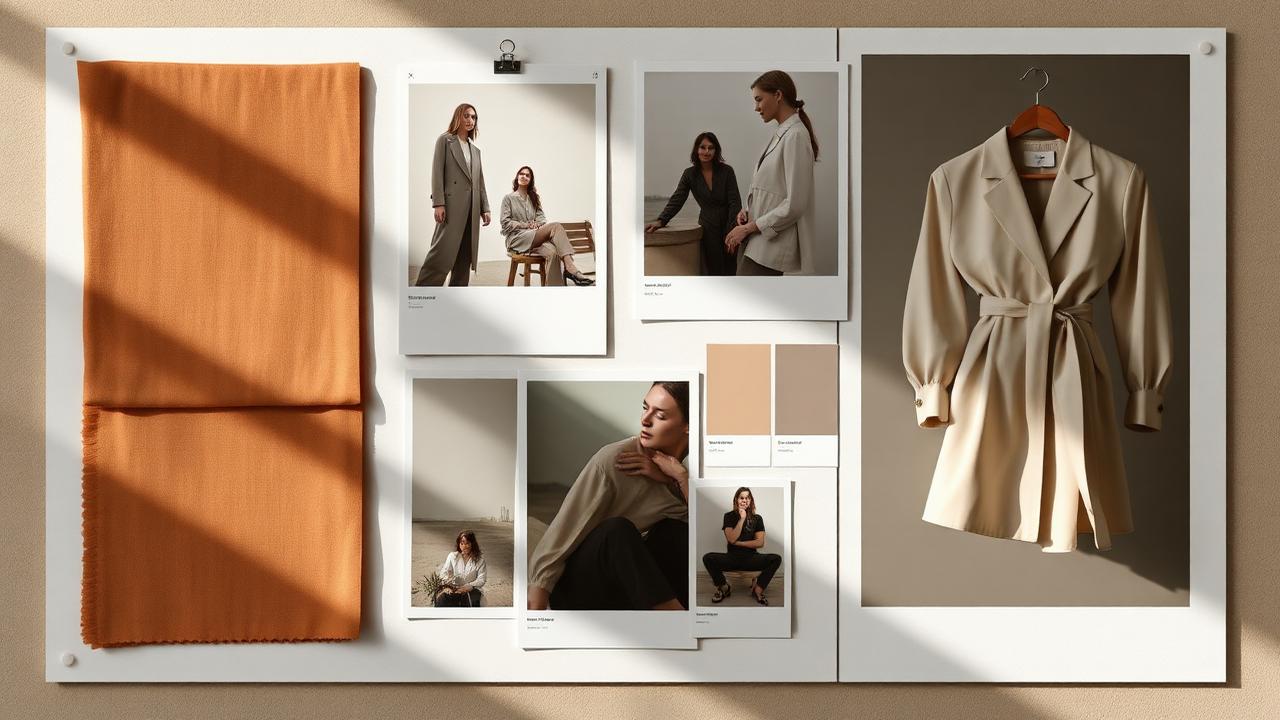
You have a folder of screenshots, three Pinterest boards, and a color you keep describing as "kind of a washed olive." That is a mood. It is not a collection yet.
A fashion moodboard generator helps you turn that pile of inspiration into a focused visual brief, and then keep going until you have product-ready visuals. Concept dies on a moodboard. The brands that ship turn it into product you can sample, shoot, and sell.
This guide covers what a fashion moodboard generator is, how to build a board that actually directs a collection, how to carry it into production, and where a human still has to decide.
Table of Contents
- TL;DR
- What is a fashion moodboard generator?
- Moodboard vs concept board vs tech pack
- Why most fashion moodboards never become product
- How a fashion moodboard generator works
- The 6 steps to build a moodboard that ships
- How to turn a moodboard into a collection concept
- What AI should not decide on a moodboard
- Moodboard to PDP, feeds, and social
- Common moodboard mistakes and fixes
- How a focused moodboard affects your calendar and margin
- How Kampana handles moodboards
- FAQ
- The bottom line
TL;DR
- A fashion moodboard generator turns scattered inspiration into a focused visual brief: theme, palette, fabrics, silhouettes, and references in one place.
- A moodboard sets direction. A concept board commits to styles. A tech pack specifies how to make them. They are three different jobs.
- The real win is not a prettier board. It is carrying the board forward into product-accurate visuals instead of letting it die as inspiration.
- Anchor the board to real color values and real fabric references, not vague names, so the rest of the line stays consistent.
- Keep a human gate on taste, brand fit, and final direction. AI assembles options. A person owns the call.
What is a fashion moodboard generator?
A fashion moodboard generator is a tool that collects your inspiration and organizes it into a clear visual brief for a collection, a season, or a single drop. Instead of a messy folder, you get a structured board: theme, color palette, key fabrics, silhouettes, and reference images.
A moodboard is a collage of images, materials, colors, and text that conveys the aesthetic direction for a project (Fashion Insiders, what is a fashion moodboard). Its main job is to focus the designer's mind on the look, the feel, and the direction before serious design work begins.
The difference between a useful generator and a digital scrapbook is what happens next. A scrapbook stops at "here is the vibe." A useful generator pushes the board toward decisions: these colors, these fabrics, these shapes, this is the line. Then it hands those decisions to the next step instead of leaving them on a wall.
Moodboard vs concept board vs tech pack
These three get used interchangeably. They are not the same, and confusing them is why concepts stall.
| Artifact | What it answers | Example |
|---|---|---|
| Moodboard | What is the mood and direction? | Theme, palette, fabrics, references for a fall outerwear story |
| Concept board | Which styles are we making? | Three jackets, two vests, a defined silhouette and color per style |
| Tech pack | How do we make each style? | BOM, measurements, construction, grading for the parka |
You build a moodboard, commit to a concept, then specify it in a tech pack. A moodboard generator helps most at the first step and should make the jump to the second one easy. For how a concept becomes a buildable spec, see how to create a fashion tech pack with AI.
Why most fashion moodboards never become product
The board looks great on the wall. Then nothing happens for three weeks. This is the normal failure, and it has clear causes.
Three problems repeat:
- The board is a mood, not a decision. It shows a feeling but never commits to specific colors, fabrics, or silhouettes, so no one can act on it.
- Colors and fabrics are vague. "Washed olive" and "soft knit" mean different things to a designer, a supplier, and a dye house, so the line drifts.
- There is no bridge to product. The board lives in one tool, the design work in another, and the gap between them is where momentum dies.
The result is a beautiful artifact that never turns into a sample. That is not a creativity problem. It is a handoff problem.
How a fashion moodboard generator works
The mechanics are simple to describe and easy to get wrong.
You feed in inspiration: reference images, a few words, brand assets, past products, or a color you like. The generator clusters those inputs into a coherent direction. It pulls out a dominant palette, suggests complementary colors, groups fabric and texture references, and proposes silhouettes that fit the theme.
A good generator does two things a folder cannot. It converts vague color into real values, so "washed olive" becomes a defined hex or Pantone reference you can carry forward (Pantone). And it keeps the board tied to your brand, so the output looks like you and not like a generic trend wall.
The quality test is whether the board is decisive. If it gives you fifty pretty images and no direction, it is a scrapbook. If it gives you a palette, a fabric story, and a short list of silhouettes you can commit to, it is doing the job.
The 6 steps to build a moodboard that ships
1. Define the brief
Decide what the board is for: a season, a single drop, a capsule, or a photoshoot concept. Knowing the purpose tells you which images, textures, and colors belong, and which do not (Points of Measure, moodboards for fashion design).
2. Gather inspiration with intent
Pull references that share a thread, not just things you like. Inspiration sources like saved boards and tear sheets are fine (Pinterest), but cull aggressively. Twelve focused references beat eighty random ones.
3. Lock the palette to real values
Turn the mood into defined color values, like hex or Pantone references, not color names. Use a color tool to build and check the palette (Adobe Color). This palette becomes the source of truth for the colorways later.
4. Build the fabric and texture story
Attach real fabric references to the board: weight, hand, finish, and texture. A board with named fabrics can be costed and sampled. A board with "soft and drapey" cannot.
5. Set the silhouette direction
Choose the shapes the collection will explore. Reference garments, flats, or rough sketches all work. This is where a mood starts becoming a line.
6. Hand it to the next step
Export the board as a usable brief: palette values, fabric list, silhouettes, and references in a format the design step can read. This is the step most boards skip, and it is the one that matters.
How to turn a moodboard into a collection concept
A moodboard is the input. A collection concept is the first real output.
The jump is about commitment. The board says "this is the direction." The concept says "these are the styles, in these colors, in these fabrics." You move from a feeling to a short, buildable list.
This is exactly the job of a collection concept from brand DNA workflow: take the brand's identity and a season's direction, and turn it into a concrete concept you can develop. For the full method, see how to build a fashion collection concept with AI.
Keep the chain tight. Mood to concept to product, with each step inheriting the palette and fabric decisions from the last, so nothing drifts. A board that keeps its color and fabric references all the way to the PDP is a board that shipped.
What AI should not decide on a moodboard
The generator assembles options. It should not own the taste.
AI should not pick your brand's point of view. It can cluster references and suggest a palette, but the decision about what is "you" is a brand call. It should not approve a direction as final. And it should not lock fabric or color choices that have cost, sourcing, or sustainability consequences without a person signing off.
A moodboard is a taste document. AI can speed up the assembly and keep it consistent. A designer still owns what the collection is about.
Moodboard to PDP, feeds, and social
A board that ends at inspiration helps no one downstream. A board that carries its decisions forward feeds the whole launch.
- PDP: the palette and fabric story set the colorways and the copy language, so the product page matches the original intent. See how to create a fashion PDP asset pack.
- Feeds: consistent color values mean each variant maps cleanly to its image, which keeps marketplace listings clean (Google Merchant Center product data spec).
- Social and campaign: the same theme and palette become the look of the launch, so the drop feels like one story instead of separate posts.
Build the direction once, carry it everywhere. That is the same logic as the rest of product creation: one source, every channel.
Common moodboard mistakes and fixes
A board with no decision
The fix: every board must end in commitments. A palette in real values, a named fabric list, and a short silhouette direction. If you cannot act on it, it is not done.
Vague color
The fix: convert every color to a defined hex or Pantone reference. "Washed olive" is a starting point, not a spec.
Too many references
The fix: cull to a focused set that shares a thread. A tight board directs. A bloated one confuses.
A board that does not look like your brand
The fix: anchor the board to your brand identity and past products, not just a trend wall, so the output reads as you.
No bridge to design
The fix: export the board as a structured brief the next step can use, instead of a flat image that someone has to re-interpret.
How a focused moodboard affects your calendar and margin
A vague board costs you time and money quietly, all season.
A focused board shortens the front of the calendar. Decisions get made once, early, in real values, so design, sampling, and sourcing do not loop back to ask "what color did we mean?" That saved time is the difference between hitting a drop date and slipping it.
It also protects margin. Clear fabric and color specs mean fewer wrong samples, fewer re-dyes, and fewer surprises at production. The board is cheap. The rework a vague board causes is not.
That is the business case. A decisive board early means a faster, cleaner path to a sellable product.
How Kampana handles moodboards
A folder of screenshots does not become a collection on its own. Kampana takes your inspiration and brand DNA and turns it into a focused direction, then carries that direction forward into product-accurate visuals, on a node-based canvas with approval gates and product-fidelity QA.
What you get
- A focused board: theme, palette in real values, fabric story, and silhouette direction.
- A direction anchored to your brand DNA, not a generic trend wall.
- A clean jump from board to collection concept to product visuals.
- Color and fabric decisions that carry through to PDP, feeds, and social.
- A human approval gate on taste and final direction.
The old way vs Kampana
| Old way | With Kampana | |
|---|---|---|
| Inputs | Scattered folders and boards | Inspiration and brand DNA in one canvas |
| Color | Vague names | Defined values carried forward |
| Output | A flat image on a wall | A structured brief that feeds design |
| Bridge to product | Manual re-interpretation | Wired straight into concept and visuals |
| Who approves | Late, unclear | Human gate + product-fidelity QA |
How it works
- Drop your inspiration and brand DNA on the canvas.
- Wire it to build a focused board: palette, fabric, silhouettes.
- Approve the direction.
- Carry the same decisions into the collection concept and product-accurate visuals.
Pricing is credit-based: no seats, no subscription, a shared pool, and credits do not expire. Start with the free starter pack. Map your run to the collection concept from brand DNA workflow, then continue into the 3D assets to ecommerce and campaign renders workflow or the ecommerce PDP asset pack. See credit pricing. For the whole drop, use the end-to-end fashion collection launch.
FAQ
What is a fashion moodboard generator?
It is a tool that turns scattered inspiration into a focused visual brief for a collection or drop, including theme, palette, fabrics, and silhouettes. The useful ones do not stop at a pretty board. They carry the decisions forward into design and product.
What is the difference between a moodboard and a concept board?
A moodboard sets the mood and direction. A concept board commits to specific styles, colors, and fabrics. You build the moodboard first, then make the concept decisions (Fashion Insiders).
How do I make a moodboard that actually leads to product?
End the board in real decisions: a palette in defined hex or Pantone values, a named fabric list, and a clear silhouette direction. Then export it as a brief the design step can use, instead of a flat image someone has to re-interpret.
Should I use real color values on a moodboard?
Yes. Convert vague color names into defined hex or Pantone references so the rest of the line stays consistent (Pantone). A color tool helps you build and check the palette (Adobe Color).
Can AI replace a designer's taste on a moodboard?
No. AI can cluster references, suggest a palette, and keep a board consistent. The decision about what fits your brand and what the collection is about is a human call.
How many references should a moodboard have?
Fewer than you think. A focused set that shares a clear thread directs a collection. A bloated board of unrelated images confuses it. Cull aggressively to the references that carry the idea.
How does a moodboard connect to a tech pack?
It does not, directly. The moodboard sets direction, the concept commits to styles, and the tech pack specifies how to make each one. The board's color and fabric decisions should flow into the tech pack so nothing drifts.
Does a moodboard generator work for a single drop, not just a full season?
Yes. Define the brief for whatever you are making, a capsule, a single drop, or a season. The smaller the scope, the tighter and more useful the board tends to be.
The bottom line
A fashion moodboard generator is only worth using if it ends the cycle of beautiful boards that never become product. The point is not a prettier wall. It is a decisive brief that moves.
Define the purpose, gather with intent, lock the palette to real values, build the fabric and silhouette story, and hand it to the next step. Mood to concept to product, with each step inheriting the last. That is how a board ships.
Send one product URL. Kampana turns it into a mini campaign pack.